How It Works: Tracking Rare CS2 Patterns
Pricing a rare pattern is hard. The Steam Market lumps every seed of a skin together, and most price checks you get on Discord or Reddit are somebody's gut feeling. I built this site because I wanted to see what a specific seed had actually sold for.
So that's what it does. Every number here is a completed sale on CSFloat, filed under the exact pattern index it belongs to.
- skins
- 74
- pattern groups
- 293
- tracked seeds
- 11,104
- recorded sales
- 56,699
Watch: The Site in 35 Seconds
A quick walkthrough from the homepage to the AK-47 | Aphrodite Pink Gems group and the price history of pattern #904, including filtering the chart down to a single wear condition.
Where the numbers come from
Every price on the site is a completed sale on CSFloat. Not an asking price, not a buy order, and not a Steam Market listing. Someone paid that amount in real money for that item, and each sale in the tables links back to CSFloat so you can check it yourself.
I skip Steam Market prices on purpose. Steam balance can only be spent inside Steam, so it trades at a discount to cash, and the Market doesn't tell you which pattern index sold anyway. Mixing the two would make every number less useful.
New sales are pulled in daily. Each one is matched to its pattern index, sorted into the right wear condition by float, and stored with its stickers and sale date. The oldest sale in the database is from Mar 16, 2023, but coverage varies a lot by skin. Some groups have hundreds of sales, others only a handful.
How to price a pattern, step by step
The screenshots below follow one real seed, AK-47 | Aphrodite #354 from the Pink Gems group, as it looked in September 2026. The live pages will have newer sales by the time you read this.
1Open the skin
Start in the Weapons directory or type the skin into the search bar at the top. The skin page shows every pattern group we track for it, split into tiers, with the median sale of the last 30 days in each wear.
Already know your pattern index? Type it into Check if your pattern is tracked. If it belongs to a group, you get a direct link to its page. If nothing comes up, the seed isn't in any group we track, which usually means it sells like a normal copy of the skin.
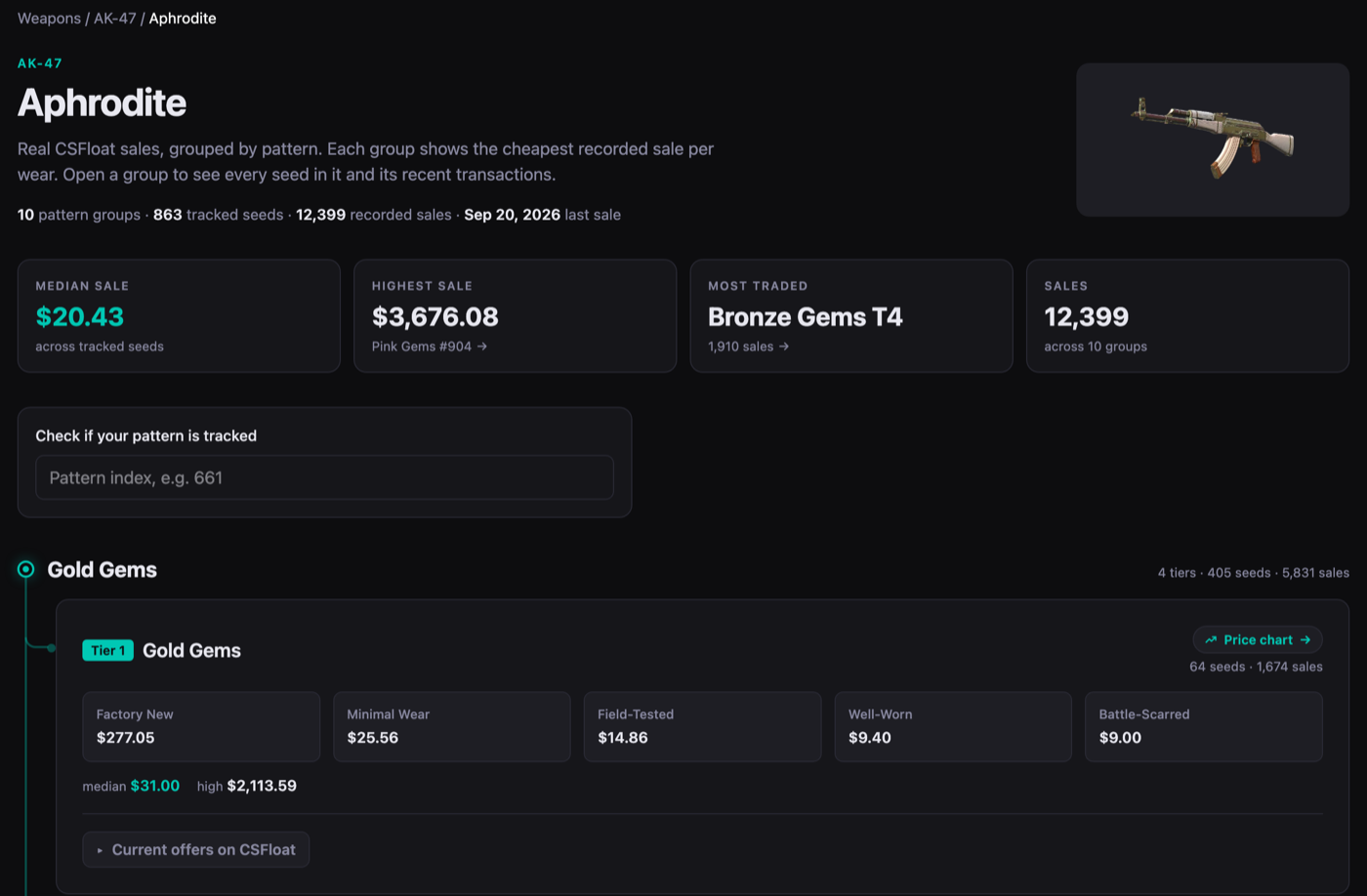
The AK-47 | Aphrodite skin page, with the pattern lookup box and the first tracked group. 2Open the pattern group
A group is a set of seeds that produce the same look collectors pay extra for, like the Pink Gems on the Aphrodite. The group page lists every seed in it with its median sale per wear.
That table is worth a look even if you only care about one seed. Groups are top-heavy. In the screenshot, #904's median Factory New sale was almost eight times #542's, and both are Tier 1 Pink Gems. The group average won't tell you much about your seed.
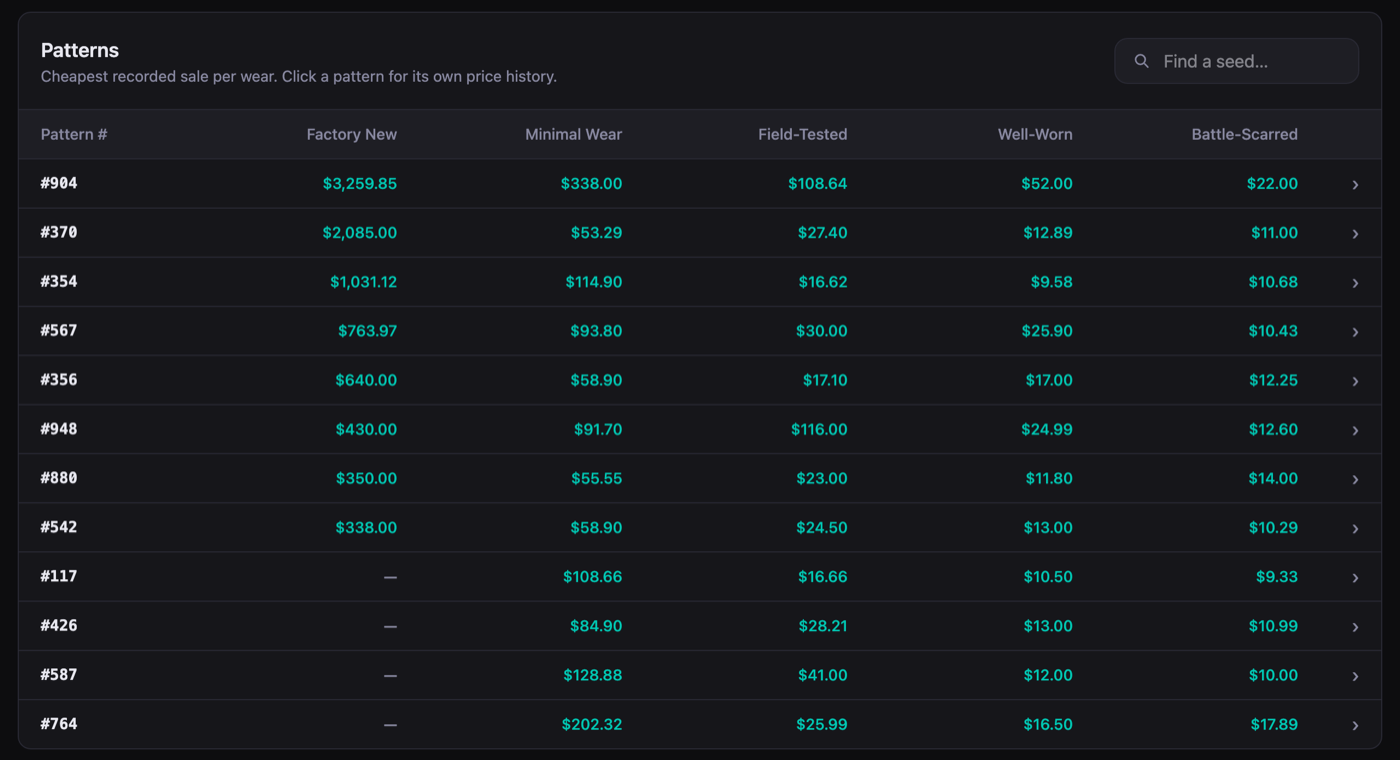
Every seed in AK-47 | Aphrodite Pink Gems, median sale per wear. 3Read the pattern page
This is where the actual answer lives. The tiles at the top give you the median across all wears, the lowest, the highest, and how many sales there are. The table under them splits that up by wear, with a median and a range for each. Further down, a chart plots the daily median for each wear condition. Click a wear box above the sales table and both the chart and the table filter to it.
Look at the median first. #354 had sold 54 times for a median of $25.41, but its highest sale was $1,031.12. That one was Factory New, and the only Factory New sale on record. Nobody should price a Well-Worn #354 off that number. Use the median for your wear from the table instead.
The sales table shows every transaction with its float, stickers and date. When one sale looks way off, the answer is usually right there in that row.
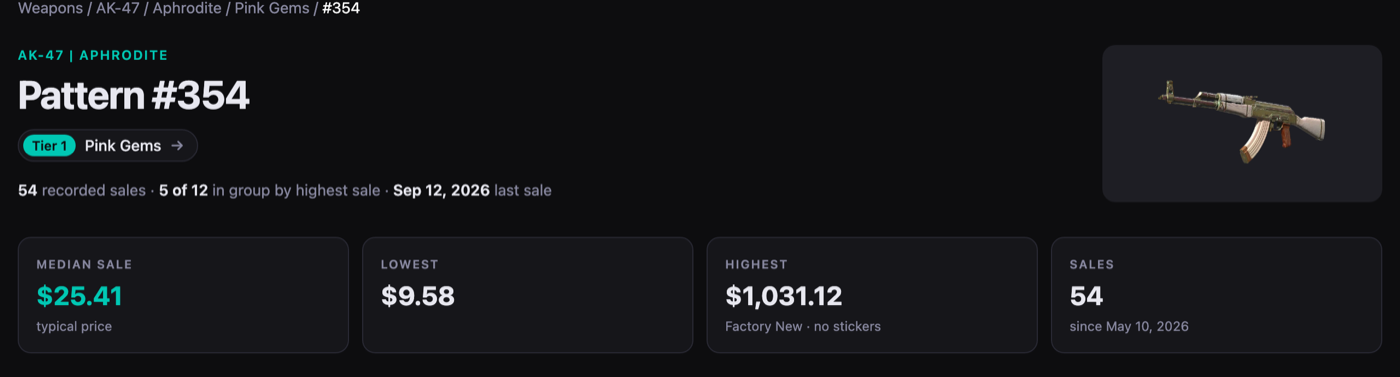
Median, low, high and sale count for AK-47 | Aphrodite #354. 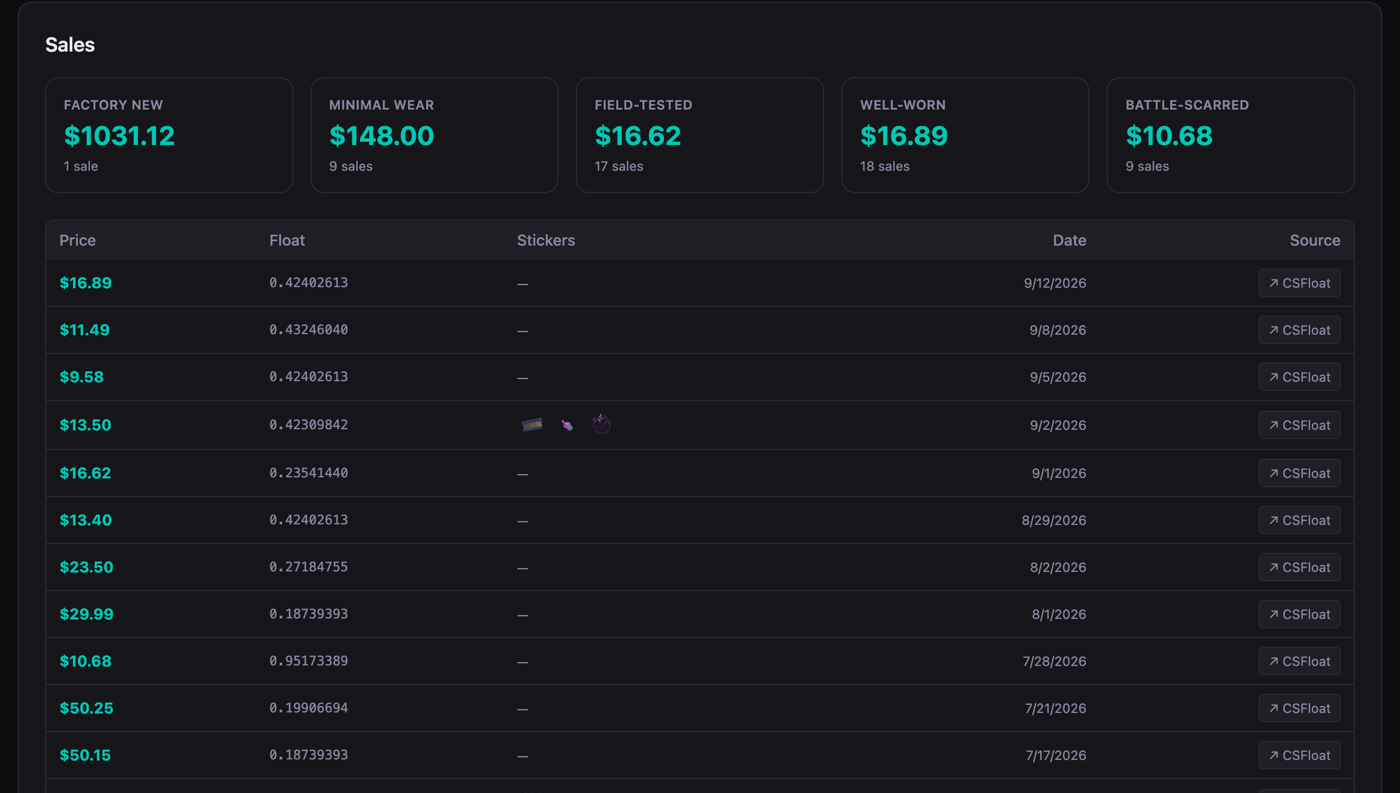
Each sale with its float, applied stickers, date and a link to CSFloat. 4Compare with what's listed right now
Pattern pages also pull in live CSFloat listings for the same seed. Each one is labelled with how far it sits over or under the median sale for its wear, so an overpriced listing stands out.
Buying? Use it to spot a fair deal. Selling? It shows what you're competing with. Just keep in mind that listings are asking prices. Only the sales history tells you what people actually paid.
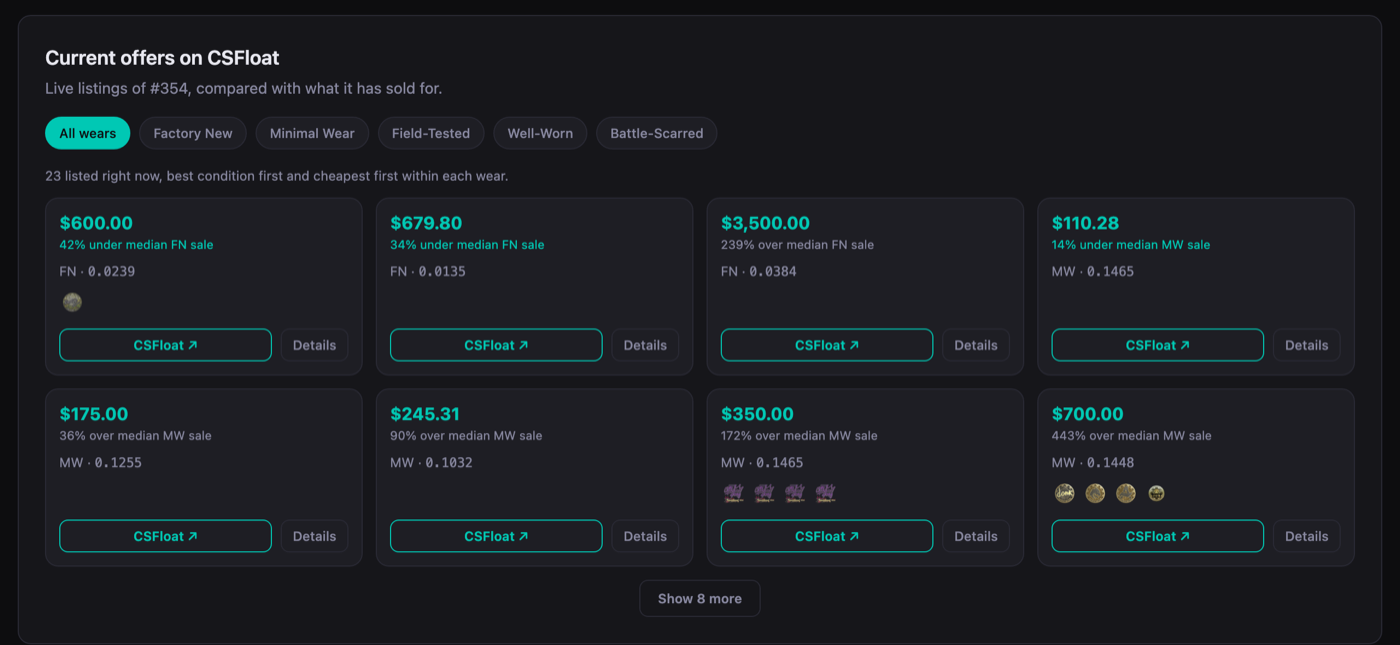
Live CSFloat listings of #354, each compared with the median sale for its wear. 5Or scan your whole inventory
Got a lot of skins to check? Paste your Steam profile link into the inventory pattern checker. It reads your public inventory, flags every item whose seed falls in a tracked group, and gives an estimate from the same sales data. It doesn't account for stickers, and nothing gets stored. Your inventory needs to be set to public for it to work.
What moves the price of a pattern
Two copies of the same seed can sell for very different amounts. When a sale looks odd, check these before you trust it.
Wear condition
The biggest factor by far. A Factory New and a Battle-Scarred copy of the same seed are close to different items. Only compare sales in the same wear, which is why every chart and table on the site splits them.
Float inside the wear
Wears are float ranges. Minimal Wear runs from 0.07 to 0.15, and a 0.071 usually sells for more than a 0.149. On some finishes a low float also makes the pattern itself look cleaner.
Stickers
Expensive stickers explain most of the extreme outliers. Sticker icons sit right next to each sale, and the highest-sale tile on a pattern page says whether that sale had any.
How many sales there are
A median built on 50 sales means something. One built on two sales is a rough hint. Top-tier seeds rarely change hands, so for the best patterns a single sale can be all there is.
Why the pattern index matters
Every CS2 skin gets a paint seed (also called a pattern index) when it drops. On most finishes you can't tell one seed from another. On a few, the seed decides where the colours land: how much blue shows on a Case Hardened, where the gems sit on an Aphrodite, how far a Fade runs.
The seeds with the best-looking results sell for a lot more than the rest, and the Steam Market price for the skin doesn't reflect that at all. The glossary and guides go deeper on specific skins and what makes their best seeds special.
What the site doesn't do
- It only covers seeds in groups we track. Seeds outside those groups sell like the normal skin, and you'll find them priced better on the Market or CSFloat directly.
- It doesn't put a value on stickers. They show up next to each sale so you can see their effect, but the site won't tell you what a craft is worth.
- It only uses CSFloat. Trades on other marketplaces and private deals aren't in the data.
- It isn't an appraisal. Past sales are the best evidence there is, but the next buyer decides the price.
Look up your pattern
Pick a weapon, open the skin, and type in your pattern index. It takes less than a minute.