How to Check the Pattern Index of a CS2 Skin
Copy the skin's inspect link and run it through a float checker such as CSFloat: the paint seed it returns is the pattern index. How to do it for your own items and for listings, and how to tell whether the seed is worth anything.
The fastest way is right inside the game: inspect the skin in your inventory and hover the small info icon on the preview. It shows the pattern index directly, no link-copying involved. Don't have the game open, or checking a listing instead of your own item? Copy the inspect link and run it through a checker such as CSFloat's instead, which labels the same number "Paint Seed."
Knowing the number is the easy part. Whether anybody will pay extra for it depends on the finish, which is what the second half of this guide covers.
hover the info icon in-game
This is how most players actually check a pattern, since it doesn't require a browser at all. Open your inventory in the CS2 client, select the skin, and click Inspect to bring up the 3D preview.
In the corner of that preview panel is a small circular info icon (ⓘ). Hover it (or tap it on the Steam Deck / mobile app) and a card pops up with the item's details: Finish Style, Finish Catalog, Pattern Template, and Wear Rating. Pattern Template is the same number as the pattern index and paint seed.
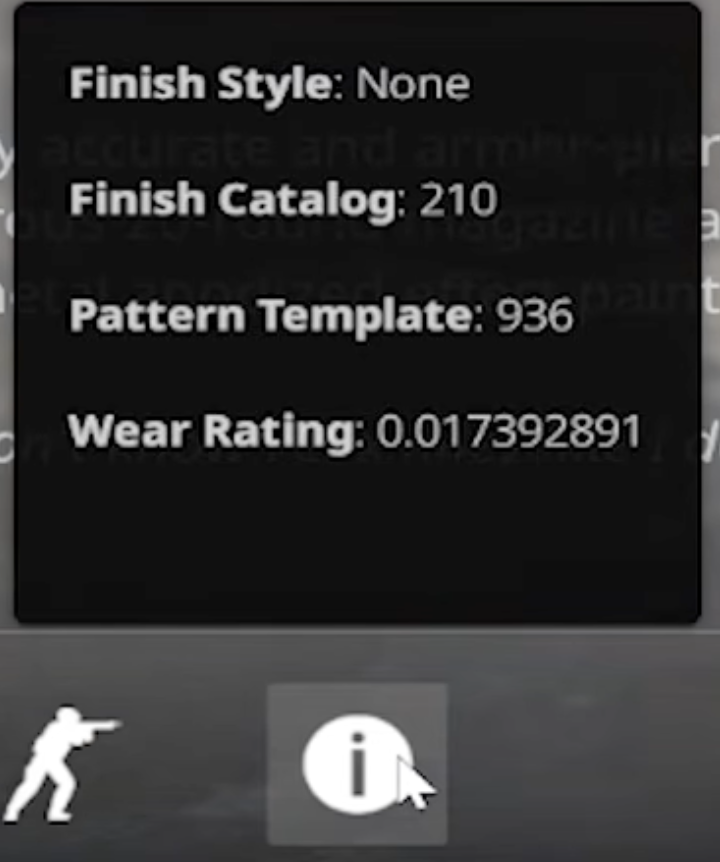
This only works for items sitting in your own inventory. For a listing you're thinking about buying, or an item you don't own yet, skip to Step 3.
check whether the seed matters
For most skins it doesn't. A Redline with seed 12 and a Redline with seed 812 look the same to everyone, and the Steam price for your wear is a fair guide.
A short list of finishes is different. On these, the seed decides where the colours land, and the market pays for it:
| Finish | Start here |
|---|---|
| Case Hardened | AK-47 Case Hardened Tier 1 Blue Gems |
| Heat Treated | Desert Eagle Heat Treated Tier 1 Blue Gems |
| Fade | Glock-18 Fade 100% |
| Aphrodite | AK-47 Aphrodite Pink Gems |
Open your skin from the weapons directory, look through its groups and search for your seed. Say you checked an AK-47 Case Hardened and the checker said 661. That seed sits in the Tier 1 Blue Gem group, one of seven. If your seed isn't in any group on the page, you have a regular copy.
For an AK-47 Case Hardened you can check it right here:
A matching seed isn't a price yet
Finding your seed in a group tells you it's in the right room. Where it lands in that room is down to three other things.
Wear, for one. A Battle-Scarred copy of a good seed can sell for a fraction of a Factory New one (float values explained has the table). Then there are stickers, which can inflate a single sale so much that it tells you nothing about the seed (how stickers affect skin prices). And groups are top-heavy. The best seed in a tier often sells for several times what the fifth best does, so read the price for your seed's own page, not the group average.
Here's what a larger group looks like in live data:
Every price on this site comes from completed CSFloat cash sales, recorded per pattern index. Steam Community Market prices aren't used, since Steam never records the seed.
For more on what the number does, read what is a CS2 pattern index. Terms you haven't seen before are in the CS2 pattern glossary.
Frequently Asked Questions
How do I check the pattern index of a CS2 skin?
Copy the item's inspect link from your Steam inventory and paste it into a float checker such as the one on CSFloat. The number it labels 'Paint Seed' is the pattern index.
Is the paint seed the same as the pattern index?
Yes. Paint seed, pattern index, pattern and seed all mean the same number: an integer from 0 to 1000 fixed when the item was created.
What's the difference between paint seed and paint index?
The paint seed is the pattern index and varies from item to item. The paint index identifies the finish itself, so every AK-47 Case Hardened shares the same paint index but has its own paint seed.
Can I check the pattern of a skin on the Steam Market before buying it?
Steam's listing page doesn't show it. Each listing has an inspect link you can run through a checker, or you can install a browser extension like CSFloat's that adds the float and paint seed next to every Steam listing.
How do I know if my pattern index is rare?
Only a handful of finishes care about the seed. Open your skin's page on this site and check whether your seed appears in one of its tracked groups. If it doesn't, you have a regular copy.
Do stickers or name tags change the pattern index?
No. The seed is fixed when the item is created. Applying or scraping stickers and adding a name tag don't touch it.
Can I see the pattern index without leaving CS2?
Yes. Open your inventory, select the skin, and click Inspect. A small info icon sits in the corner of the inspect panel, and hovering it shows Pattern Template along with the Wear Rating. No inspect link or third-party site needed.